Hello all,
I am new to this, first time with node red. I purchased the enterprise gateway lite and a temp/humidity sensor.
All the tutorials & documentation I have seen show there is a pre-loaded wireless gateway and debug node. Mine does not have that. What is the wireless gateway settings supposed to be? Can anyone share a picture of the settings when you double click on the wireless gateway node. Everything document/video shows that the gateway node in the ready state. I cannot get mine to ready.
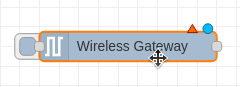
Hi @dgohr395 sure, you can manually drag and drop a Wireless Gateway node from nodes palette to your workspace.
-
Then double click on it to open its properties:
-
If you click on Serial Device dropdown and you see the ‘/dev/ttymxc2’ option, please select it, and skip the step 3 and step 4 and go to step 5:
-
If you see the ‘Add new ncd-gateway-config’:
3.1 Then click on ‘plus’ icon, to add new ncd-gateway-config node:
-
You will need to set Modem Type → USB (Serial), Serial Port → /dev/ttymxc2, finally click on Add button:
-
Click on Done button:
-
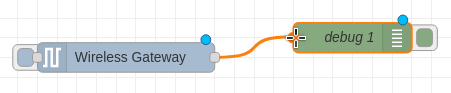
Drag and drop a debug node from nodes palette to your workspace:
-
Connect the output of the Wireless Gateway node to the input of the debug node:
-
Finally click on Deploy button to save and apply the changes:
-
After deploy, you should be able to see the Wireless mac address into debug window.
Please try this and feel free to share your results or let me know if you have any questions.
Thank you,
Eduardo M
Thank you! I’ll try this out, see what i get.
Great! Thanks.
Eduardo M.
Again, still an infant with this node-red stuff.
Wondering how you knew what needed to go into the serial port box or where did you get the info?
I assume this is specific to the type of sensor?
Enterprise IIoT Gateway uses ‘/dev/ttymxc2’ serial port to communicate with the Wireless Module, for Gateway, this value always be the same.
Let me share you a video to get started as your reference:
- The type of sensor is included into sensor_data message:
msg.payload.sensor_type here is an example:
Thanks,
Eduardo M
Hello I am new to all of this so any help or direction would be appreciated. I have the Atrium gateway and I have the 119 - Machine Runtime Hour Meter. From my understanding if I want to change the settings for the Accelerometer or Magnetometer for thresholds I need to make them through Node Red- I believe I added the Wireless gateway correctly but all it keeps saying is connecting. I feel like there is just something fundamentally I am not understanding. Also once the thresholds are configured would I still see the device in Atrium and could I still use those dashboards?
I made some progress but don’t know if this is how it should be. I needed to stop the atrium-ingest service and start the node-red one and then the gateway connected and I was able to get the sensor connected and then I had to revert it to get the sensor communication with Atrium once more. Is this the way this is supposed to work?
Another Item, I only was using node red as there initially nothing showing under the settings for the sensor. In all of my other troubleshooting I upgrade the box from 2.5.2 to 2.6.0 and now I have options under Sensor configuration but when I make and change and click Save sensor settings nothing happens.
Hi @buddellk you can perform sensor configuration using Atrium interface, Node-RED is not necessary you can disable Node-RED on your Atrium.
Your last message is correct: once the hardware configuration is saved, Atrium waits for a FLY message. The configuration process will start automatically with the sensor’s next scheduled FLY message. To start the update immediately, you can restart the sensor using one of these methods:
- Without opening the enclosure: Briefly hold a magnet near the external RESET reed switch, then remove it.
- Inside the enclosure: Remove the lid, then press and release the internal reset button.
Thanks
That makes sense. I then still have the issue when I have the device communicating with Atrium that the sensor setting changes I make never seem to update they always just say pending. I reset the sensor via the magnetic switch and it never changes.
Hi @buddellk After resetting the sensor, do you see the LED blinking? This indicates that the sensor is actively transmitting data to the Gateway.
Additionally, if you navigate to the main dashboard, do you see the sensor data appearing?
thanks.
Yes when I use the magnetic reset the lights flash, also the device is set to send data every 60 seconds as well as when there is a changed and it flashes for each. It has been several hours since i made the changes and still sitting at pending.
Hi @buddellk could you share your Sensor Decoder Library version, go to Atrium interface > Settings tab > Updates on left menu and check your version, if available click on update.
On ‘Configure sensor’ tab, click on the ‘Reset to Current Values’ button and then click on the ‘Save Hardware Setting’ button, and reset the sensor.
Also let me ask you how did you change the transmission interval from 30 minutes to 1 minute and the push notification?
What are the settings you wants to set to the sensor?
When I click the reset to current values the values do change momentarily for 2-3 seconds then the original changes come back.
I had to make all of the current changes while it was communicating to Node-Red and not Atrium.
I just want to be able to make changes to this sensor when I deploy it to our production facility, I will not be onsite so if I need to make a tweak here and there, for accelerometer sensitivity, shift time, etc I want to be able to do it without someone onsite resetting the sensor
Hi @buddellk Okay, thank you for the information, could you confirm Node-RED is stopped? If it is still running, it could cause a conflict.
I confirmed it is stopped and still the same issue. I remove the sensor form the system and factory reset it and readded it and that did not resolve the issue either. I removed the sensor and then purged all of the data and that also did not resolve it. What’s interesting is that when I add the sensor back and go under configure sensor my previous setting that I wanted to change too are still there. Is there a way to reload the Atrium device, essentially a factory reset to see if there is something stuck on it?
We published an update for Atrium. If you go to settings/updates and check for updates for the platform you should see 2.7.1 available. Update to that.
After updating you can open the settings for the sensor again, then click the Reset to Current Values button at the bottom, then at the top click the drop down next to last check in time and you may see a button there to Discard Current Changes. That should wipe any settings Atrium is currently attempting to apply to the sensor.


